

在編程裡,其中一個最重要的概念是函數範圍(scope of variable)。這是一個怎樣的概念?
比如說,我們有麥當勞與肯德基的外送餐單。麥當勞的餐點裡有麥樂雞套餐,而肯德基的菜單裡有家鄉雞套餐。
如果我們想點麥樂雞套餐的話,我們不能致電肯德基的外送熱線,因為只有麥當勞有這個餐點。
從編程的角度,麥樂雞套餐只是局部地定義(locally defined)在麥當勞的餐單。當您嘗試在肯德基的餐單尋找(reference)麥樂雞套餐,會回傳錯誤。
到底在 Python 裡的 local scope 是如何運作的?
局部定義 (Local)
相信大家對局部定義(local scope)的函數不太陌生,因為只要您寫過一個 Python 的自訂功能便會接觸過。
def customFunction():
  local_variable = 10
  print('在 customFunction 裡呼喚 local_variable 回傳:', local_variable)

customFunction()
print('在 customFunction 外呼喚 local_variable 回傳:', local_variable)
註:先按一下綠色按鈕 “Run” 執行代碼,讓您能在 IPython Shell 看到編程結果!
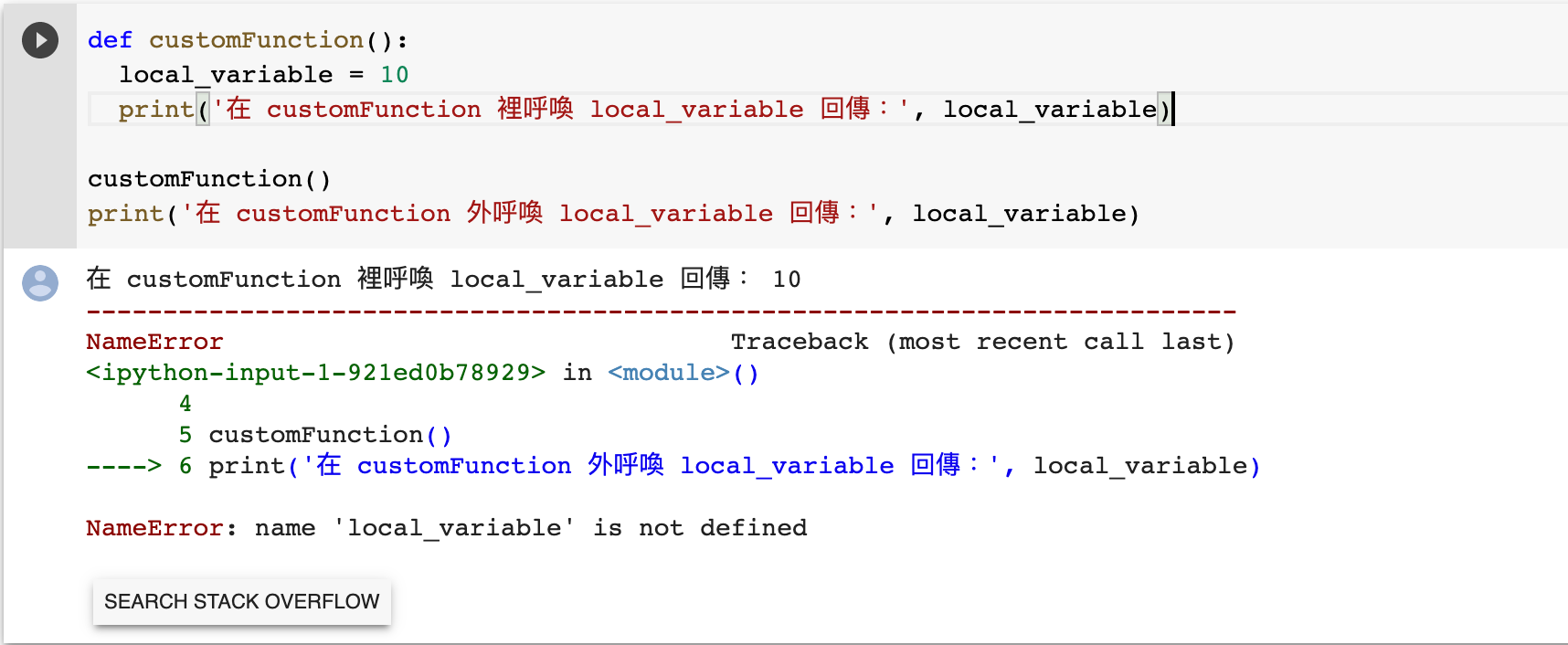
在以上的例子,我們在一個 Python 自訂功能 customFunction() 裡定義了 local_variable,並使之等於 10。
當我們在 customFunction() 裡列印 local_variable(第 3 行),可以成功獲取 10 的回傳,但當我們在 customFunction() 外列印 local_variable(最後 1 行),Python 卻會回傳錯誤。
在 customFunction() 外列印 local_variable 就如在肯德基點麥樂雞套餐,當然不能。
原理是,當我們踏進(step into)customFunction() 時,Python 會建立一個名為 local_variable 的函數。但當我們離開(exit)customFunction() 後,Python 便會銷毀這個 local_variable 的函數,以致您不能繼續使用 local_variable。
所以,我們的例子最後一行出現了 NameError 的錯誤,因為於 Python 而言,local_variable 是一個未定義(undefined)的函數。
假如我們先在 customFunction() 外定義了 local_variable,再嘗試在 customFunction() 裡改變其值(value)可以嗎?這就牽涉到局部 vs 總體(local vs global)的問題了。
總體定義 (Global)
some_variable = 20            # 總體定義 Global scope
def customFunction():
  some_variable = 10          # 局部定義 Local scope
  print('在 customFunction 裡呼喚 some_variable 回傳:', some_variable)

customFunction()
print('在 customFunction 外呼喚 some_variable 回傳:', some_variable)
註:先按一下綠色按鈕 “Run” 執行代碼,讓您能在 IPython Shell 看到編程結果!
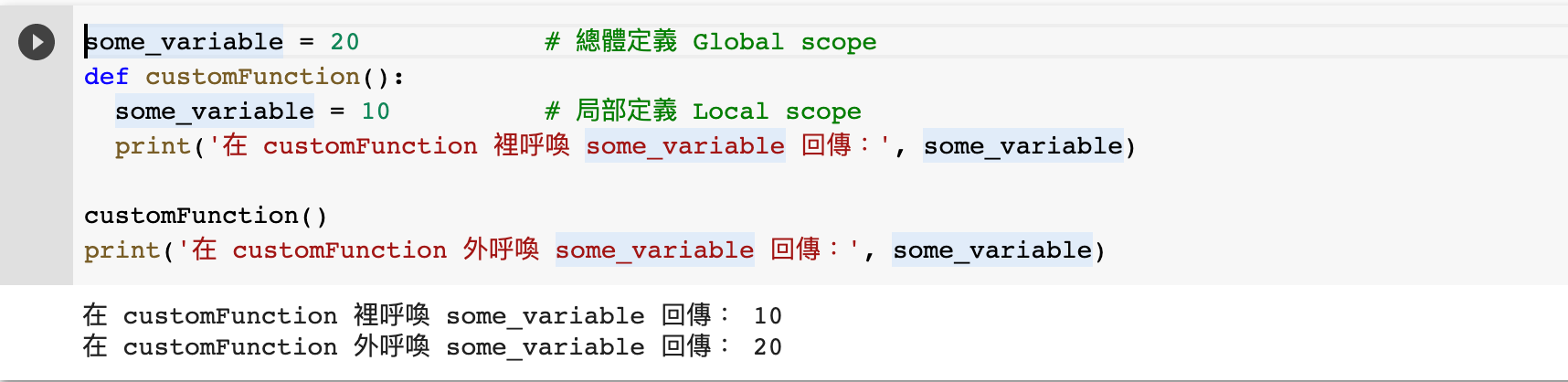
以上的例子說明,即便我們嘗試在自訂功能裡更改功能外的函數(從 20 改為 10),離開自訂功能後,函數值依然是 20。
進階地說,這是因為開頭的 some_variable 函數與 customFunction() 裡的 some_variable 指向不同的物件/記憶體位址(RAM location)。所以,我們在 customFunction() 裡局部定義(local scope)的 some_variable 其實與外面總體定義(global scope)的 some_variable 不同。
進階:檢查函數的記憶體位址
some_variable = 20            # 總體定義 Global scope
def customFunction():
  some_variable = 10          # 局部定義 Local scope
  print('在 customFunction 裡的 some_variable 記憶體位址:', id(some_variable))

customFunction()
print('在 customFunction 外的 some_variable 記憶體位址:', id(some_variable))
註:先按一下綠色按鈕 “Run” 執行代碼,讓您能在 IPython Shell 看到編程結果!
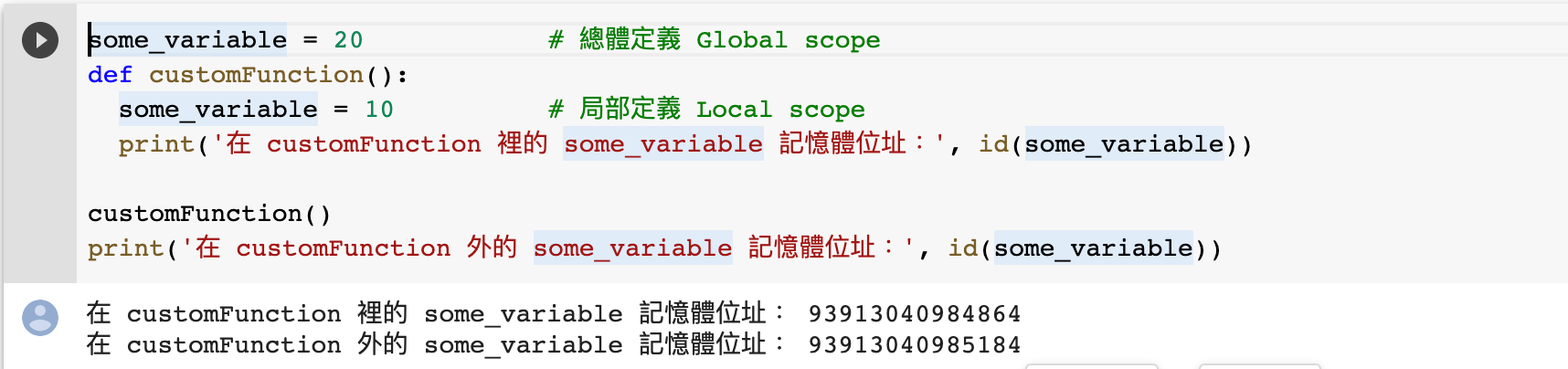
我們可以簡單地檢查這 2 個 some_variable 的記憶體位址。在以上例子,我們使用 id() 這個功能檢查函數的記憶體位址(RAM location),會發現其實這兩個 some_variable 的位址不同。因此,我們不能直接在自訂功能裡更改總體定義(global scope)的函數。
如果我非要在自訂功能裡更改總體定義的函數,可以嗎?
救星:global 關鍵字
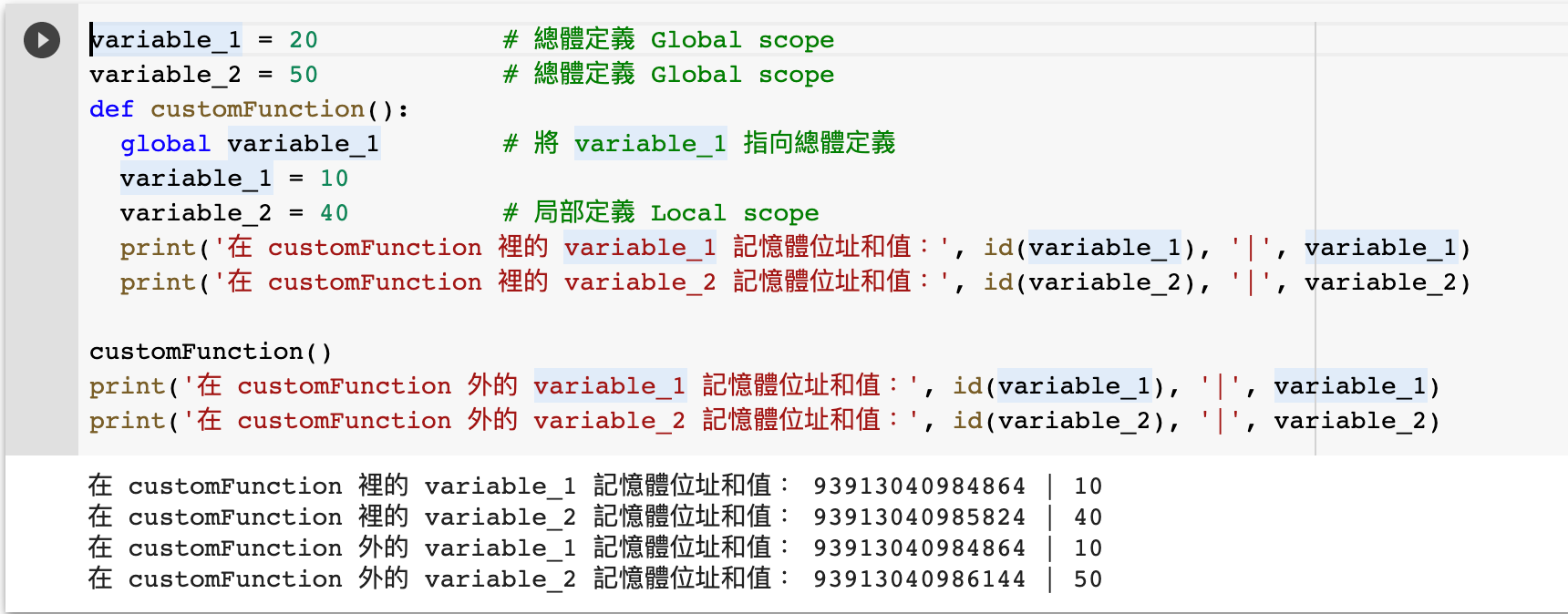
variable_1 = 20            # 總體定義 Global scope
variable_2 = 50            # 總體定義 Global scope
def customFunction():
  global variable_1        # 將 variable_1 指向總體定義
  variable_1 = 10
  variable_2 = 40          # 局部定義 Local scope
  print('在 customFunction 裡的 variable_1 記憶體位址和值:', id(variable_1), '|', variable_1)
  print('在 customFunction 裡的 variable_2 記憶體位址和值:', id(variable_2), '|', variable_2)

customFunction()
print('在 customFunction 外的 variable_1 記憶體位址和值:', id(variable_1), '|', variable_1)
print('在 customFunction 外的 variable_2 記憶體位址和值:', id(variable_2), '|', variable_2)
註:先按一下綠色按鈕 “Run” 執行代碼,讓您能在 IPython Shell 看到編程結果!
我們其實可以使用一個關鍵字,global,便可以在自訂功能裡更改總體定義(global scope)的函數。
在以上的例子,我們定義了 2 個函數,而我們同樣嘗試在 customFunction() 裡更改這 2 個函數的值。
不同的是,我們只在 customFunction() 的開首裡加入 global variable_1。
| 值 | variable_1 | variable_2 |
|---|---|---|
| customFunction() 內 | 10 | 40 |
| customFunction() 外 | 10 | 50 |
從上圖可見,只有 variable_1 在 customFunction() 裡和外的值是一樣的 10,而 variable_2 則不同。
這是因為我們透過 global variable_1 指示 Python 把 variable_1 變成一個可以在自訂功能裡存取的函數,以致我們在 variable_1 = 10 時,系統不會製造出新的局部定義函數(local scope variable),而是直接更改在 customFunction() 外定義的 variable_1。
至於 variable_2,雖然我們亦嘗試在 customFunction() 把值從 50 改為 40,但因為我們沒有加入 global variable_2,以致系統把一個新的局部定義函數設為 40,而非把總體定義的 variable_2 改為 40。
因此,當我們在 customFunction() 外呼叫 variable_2 時,系統便會把總體定義的 variable_2 回傳,而這個 variable_2 不被我們在 customFunction() 內的更改影響。
進階:檢查 global 函數的記憶體位址
| 記憶體位址 | variable_1 | variable_2 |
|---|---|---|
| customFunction() 內 | 93913040984864 | 93913040985824 |
| customFunction() 外 | 93913040984864 | 93913040986144 |
我們也可以用記憶體位址印證我們剛才的推論。
當我們使用 global variable_1 時,我們在 customFunction() 裡所更改的 variable_1 便會是總體定義 (global scope)的 variable_1。所以,我們可以在 customFunction() 裡和外見到同一個記憶體位址。
但我們沒有使用 global variable_2,亦因此系統在 customFunction() 裡處理 variable_2 = 40 時,悄悄地建立了新的局部定義函數(local scope variable)。所以,我們在在 customFunction() 裡和外見到不同的記憶體位址。
應用:猜數字遊戲
import random
from sys import exit
min_x = 1
max_x = 100
answer = random.randint(min_x,max_x)

def loop():
  global min_x, max_x
  while True:
    guess = input('請從 ' + str(min_x) + ' 到 ' + str(max_x) + ' 猜一個數字:')
    if guess.isnumeric():
      guess = int(guess)
      break
  if guess == answer:
    exit('恭喜您猜對了!答案是 ' + str(answer))
  elif (guess < answer) and (min_x < guess):
    min_x = guess
  elif (guess > answer) and (max_x > guess):
    max_x = guess

while True:
  loop()
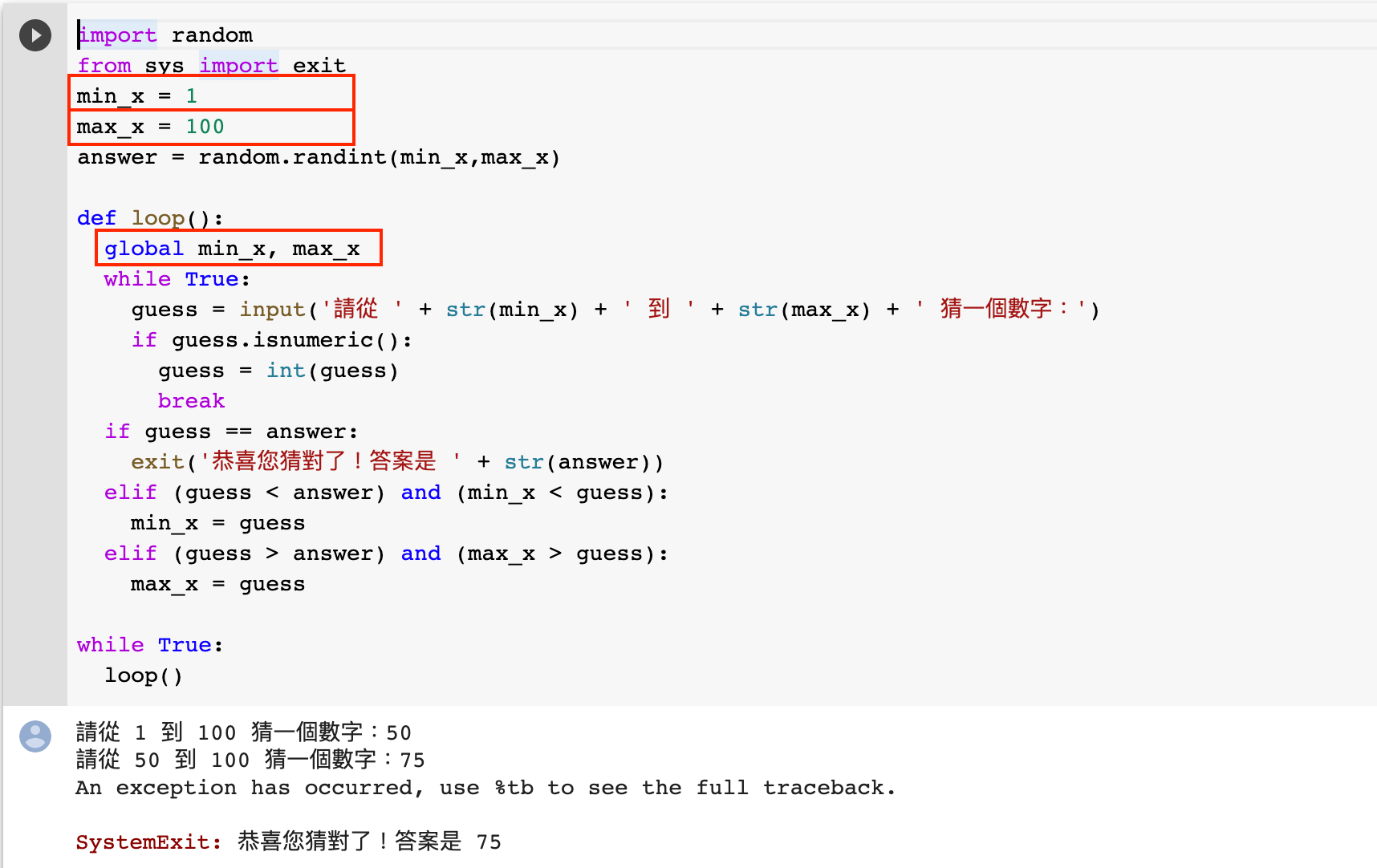
相信大家都會玩過這種猜數字的遊戲:我的答案是 75,而我先告訴您這個數字是 1 至 100 中間。如果您猜的是 70(少於我的答案),我再告訴您這個數字在 70 至 100 中間,如此類推。
我們在 Python 裡也嘗試寫出這個遊戲。我們會在另一篇教學詳細講解這個例子,但我們先把重點放到以上 loop() 的功能裡。
由於我們每次都需要根據 guess 去更新 min_x 和 max_x 的數值(例如您猜了 70,我便會把 min_x 改為 70;您再猜了 90,我便會把 max_x 改為 90),所以我們需要找個辦法在每次猜的時候把 min_x 和 max_x 的數值保存。
其中一個方法就是使用 global 關鍵字了!只要我們使用 global min_x, max_x 這句,便可以在每次猜數字(即是使用 loop() 功能)的時候更新他們的數值,使這個小遊戲能夠運行。
當然,我們也有更好的方法去更新 min_x 和 max_x。如果您還是不太清楚這個小遊戲的編程,或想知道如何更好地編程,可以閱讀這篇教學:實例1(上):猜數字遊戲!Colab 例子談編程設計和處理異常。
教學完整代碼
最後送給大家這篇教學的 Google Colab 完整代碼。如果您不懂得使用免安裝又好用的 Google Colab Notebook,記得閱讀這篇教學了:新手 1/3:5 分鐘免安裝學習 Python?Google Colab Notebook 幫緊您!
結語
希望您透過這個教學能了解更多有關局部定義(local scope)和總體定義(global scope)函數的分別,並能夠在需要的時候使用 global 關鍵字突破這個限制吧!


